Email
Management
Showcasing a mock project where I managed and organized my inbox to achieve Inbox Zero, following the workflow below:
Inbox
Audit
Identify Email
Categories
Create Labels
Set Up Filters
Archive Old Emails
Unsubscribe from Unwanted Lists
Maintain Inbox Zero
BEFORE:

Unread Emails
No labels
Important emails buried
Spam mixed with client emails
AFTER:

Inbox zero
Organized labels
Priority emails visible
Automatic Filtering

Audit
Inbox
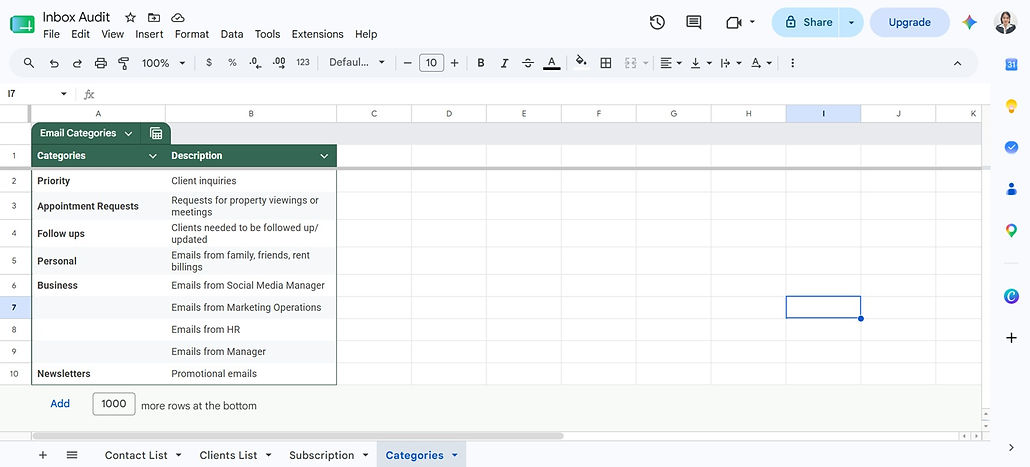
After looking through the inbox, I conduct inbox audit where I recorded the contact, client, subscription lists and email categories using google sheets.
Identify Email
Categories
After doing inbox audit, I categorized the email into 5 sections — Priority, Appointment Requests, Follow-ups, Personal, Business, and Newsletters which I will later make into labels in gmail.

Labels
Create
After categorizing the email, I started making labels for a more organized inbox.

Set Up
Filters
Set up filters for specific senders so their incoming emails automatically skip the inbox and move to their designated labels, making it easier to manage and process them.

Archive
Old Emails
Archiving old emails keeps your inbox clutter-free, making it easier to stay organized and manage important messages.

Unsubscribe From
Unwanted Lists
Unsubscribe from unwanted senders to prevent unnecessary emails from cluttering your inbox.

Maintain
Inbox Zero
Archiving old emails keeps your inbox clutter-free, making it easier to stay organized and manage important messages.